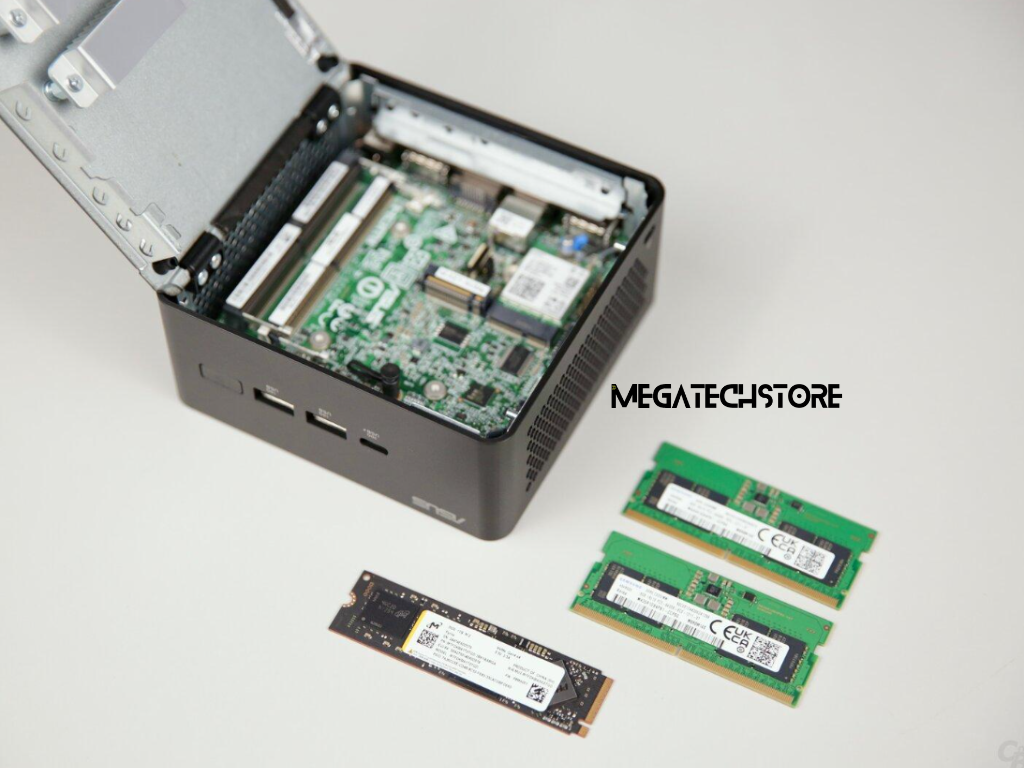
Understanding mini pc parts is an important first step for Australian buyers looking to purchase, upgrade or maintain a compact computer. Although mini PCs are significantly smaller than traditional desktop computers, they contain many of the same essential components, including processors, memory, storage drives and cooling systems.
Their compact design makes them suitable for home offices, study spaces, everyday computing and selected professional applications. However, smaller enclosures can also limit hardware upgrades and component compatibility.
Whether you are comparing your first mini pc or replacing existing computer parts, knowing what each component does can help you make a more informed purchase.
This guide explains the main hardware inside a mini PC, how different components affect performance and what to check before buying compatible parts in Australia.
Understanding the Essential Parts Inside a Mini PC
What Are Mini PC Parts and How Do They Work?
A mini PC contains several components that work together to run applications, manage information and connect external devices.
The processor, also called the CPU, handles instructions and calculations. RAM provides temporary working memory, while a storage drive keeps the operating system, installed applications and personal files.
The motherboard connects these components and allows them to communicate.
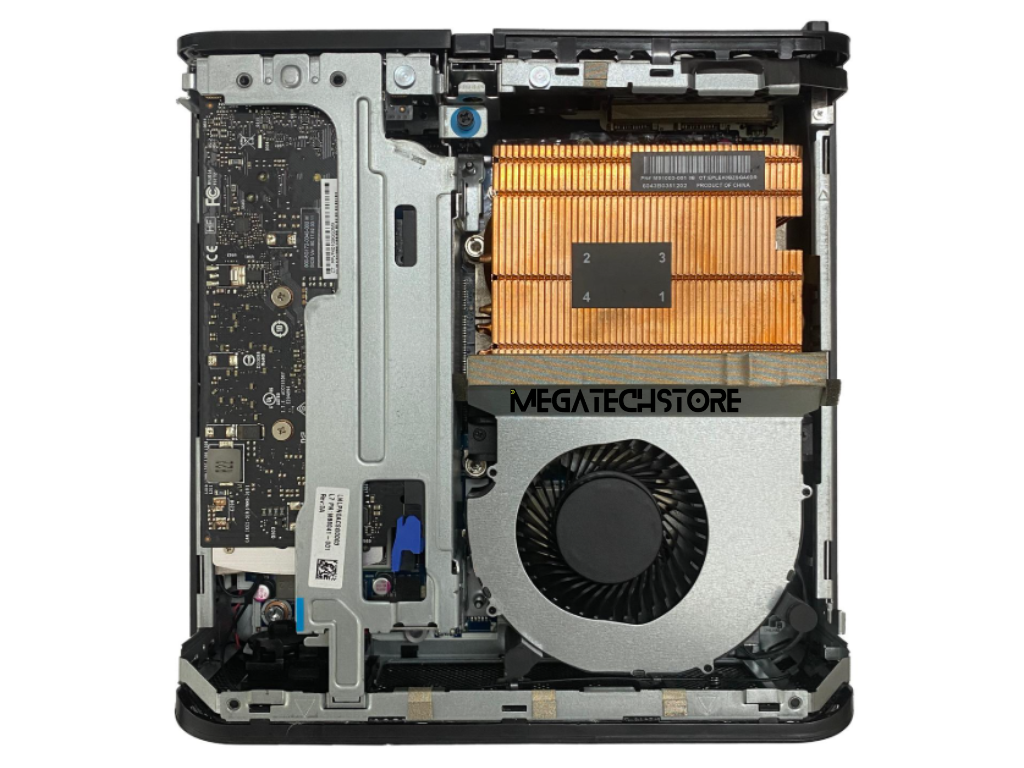
Other important mini pc parts include cooling fans, heatsinks, wireless modules and power connections. External accessories such as monitors, keyboards and mice complete the setup.
Unlike larger desktop computers, mini PCs often use compact or integrated hardware to fit everything into a smaller enclosure.
This means some components may be replaceable, while others are permanently attached or designed specifically for one model.
How a Mini PC Differs From a Traditional Desktop
A mini pc offers many familiar desktop computing functions in a smaller physical design.
For everyday activities such as browsing, document editing, online meetings and business administration, a properly configured mini PC can provide suitable performance without occupying much desk space.
Traditional desktop computers generally offer more internal room for additional storage drives, expansion cards and larger cooling systems.
Mini PCs have more limited space, which can restrict hardware upgrades and make certain components difficult to replace.
They may also use laptop-style memory and external power adapters instead of conventional desktop components.
Understanding these differences helps buyers choose between compact convenience and greater hardware expansion flexibility.
Choosing the Right Processor and Motherboard
How Processors Affect Mini PC Performance
The CPU is responsible for processing instructions and running software applications.
Its capabilities influence how comfortably a computer handles everyday tasks, multitasking and demanding workloads.
When comparing processors, buyers may encounter specifications such as core count, thread count and clock speed.
These figures provide useful information, but they should not be used alone to compare performance across different processor generations.
For basic office tasks, a modern entry-level or mid-range processor may be sufficient. More demanding software can benefit from higher-performance hardware.
When evaluating mini pc parts, consider the applications you intend to use rather than choosing the processor with the highest advertised specifications.
Many mini PC processors are soldered directly to the motherboard, making conventional CPU upgrades impractical.
Understanding the Mini PC Motherboard and Expansion Limits
The motherboard connects the processor, memory, storage and communication hardware.
It also determines which internal connectors and expansion options are available.
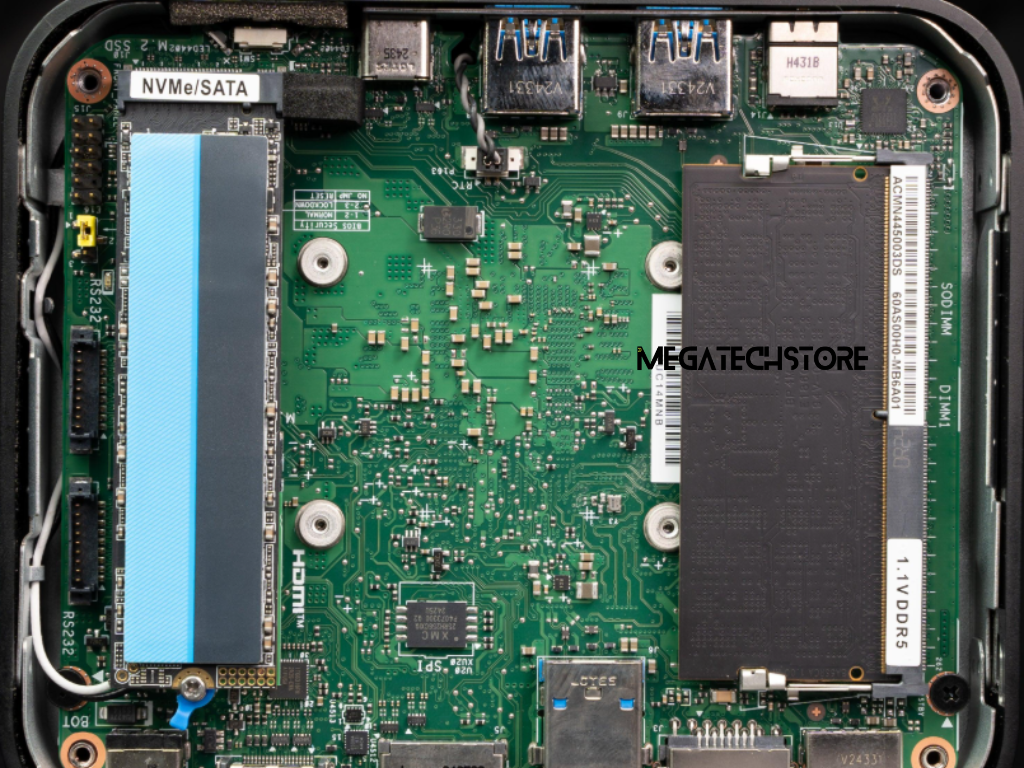
A mini pc motherboard may include SO-DIMM memory slots, M.2 storage connectors and interfaces for wireless networking modules.
However, the presence of a particular connector does not guarantee support for every component that physically fits.
Compatibility can depend on the interface, supported capacities, firmware and the space available inside the enclosure.
Because mini PCs frequently use specialised motherboard layouts, replacing the motherboard is generally more complicated than upgrading RAM or storage.
For first-time buyers, choosing a model with suitable built-in capabilities is often more practical than planning extensive hardware modifications later.
Understanding RAM and Storage Options
Choosing Compatible Mini PC Memory
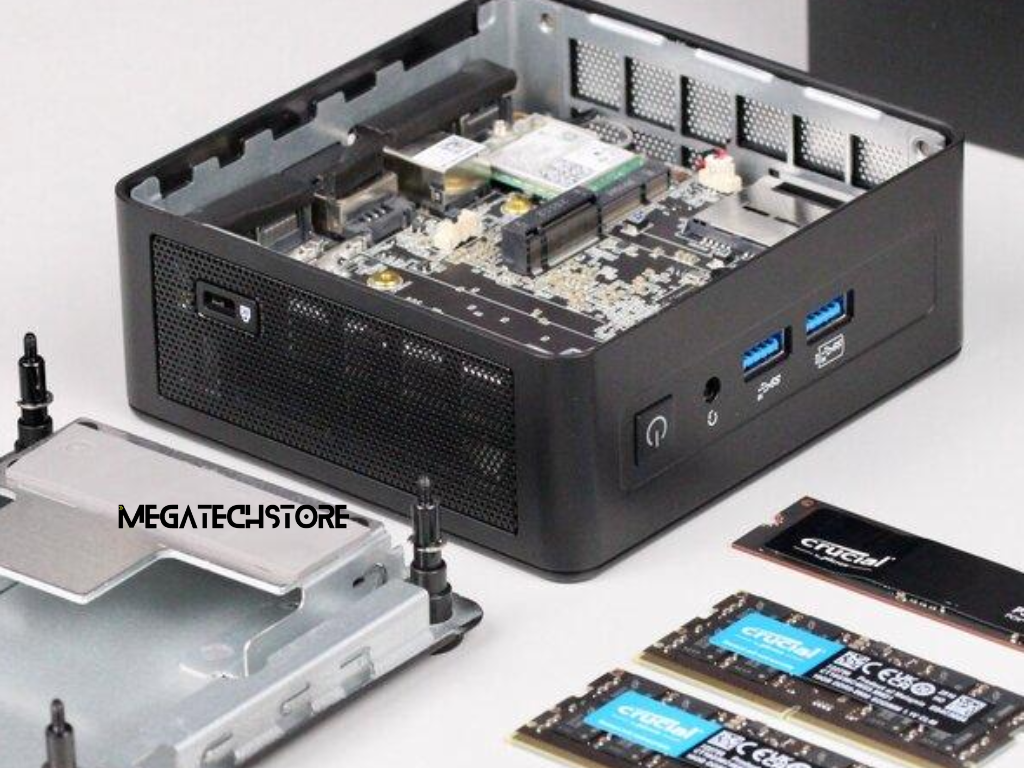
RAM allows the computer to keep information readily available while applications are running.
Having sufficient memory can improve multitasking, particularly when several programs or browser tabs are open simultaneously.
Many upgradeable mini PCs use SO-DIMM memory modules, which are smaller than standard desktop RAM.
Common memory generations include DDR4 and DDR5. These are not interchangeable, and the supported type depends on the specific computer.
Buyers should also check maximum memory capacity, supported speeds and the number of available slots.
Some compact computers use soldered memory, which cannot be upgraded through ordinary RAM replacement.
Before purchasing mini pc parts for a memory upgrade, confirm the exact model specifications and existing configuration.
Comparing SSD Storage and Available Drive Slots
Solid-state drives, or SSDs, store the operating system, applications and files.
Many modern mini PCs support compact M.2 SSDs, although their storage capabilities vary.
An important distinction is that M.2 describes the physical form factor and connector, while NVMe and SATA describe different storage technologies or interfaces.
An M.2 drive that physically fits a slot is not necessarily electrically compatible with it.
Buyers should confirm the supported interface and drive dimensions, such as M.2 2280, before ordering.
Some mini PCs have multiple storage slots, while others support only one internal drive.
For users maintaining large files or installing many applications, choosing an appropriate storage capacity can reduce the need for early upgrades.
Cooling, Power Supply and Connectivity Components
Why Mini PC Cooling and Power Requirements Matter
Compact computers generate heat during operation, making cooling an important part of their design.
Cooling fans, heatsinks and ventilation openings help manage temperatures while the computer is running.
Dust accumulation or restricted airflow can affect cooling efficiency, particularly when a device operates in a confined space.
Cooling components may be designed specifically for the enclosure, so replacement fans and heatsinks should be checked for model compatibility.
Power requirements are equally important.
Many mini PCs use external power adapters, but these are not universally interchangeable.
Buyers should verify the manufacturer’s specified voltage, power rating, connector dimensions and polarity before purchasing a replacement.
When choosing mini pc parts, correct electrical and physical compatibility should take priority over appearance or price.
Checking USB, HDMI, Wi-Fi and Ethernet Connections
Connectivity affects how easily a mini PC works with external monitors, keyboards, storage devices and networks.
Common connections include USB-A, USB-C, HDMI, DisplayPort and Ethernet.
Wi-Fi and Bluetooth may also be integrated into the system.
Not every USB-C port supports the same features. Some provide data transfer only, while others support video output or particular power functions.
Businesses using multiple monitors should check the number of supported displays, resolutions and refresh rates.
For home office users, reliable network connectivity and sufficient peripheral ports can be just as important as processor performance.
Before buying additional accessories, review the model’s actual connection capabilities.
Comparing Mini PC Models and Available Upgrades
What to Check When Buying a Minisforum PC
MINISFORUM produces compact computers with different processors, memory configurations and connectivity options.
Australian buyers researching minisforum australia should compare individual models rather than assuming the entire range offers identical hardware.
A minisforum pc may include removable SO-DIMM memory, one or more M.2 storage slots and a selection of modern display or network connections.
For example, official specifications for certain MINISFORUM systems identify DDR5 SO-DIMM memory support and M.2 NVMe storage options.
However, these capabilities depend on the exact model.
Buyers should review the processor, included memory, storage capacity, ports and operating system before purchasing.
It is also worth checking whether a computer is supplied fully configured or as a barebones system requiring additional components.
Which Mini PC Parts Can Be Upgraded Later?
Upgradeability is an important consideration for buyers who intend to keep their computer for several years.
Depending on the model, RAM and SSDs may be accessible and replaceable.
Some systems also allow wireless modules to be changed, although this depends on internal design and compatibility.
Processors and integrated graphics are generally much harder to upgrade because they are often attached directly to the motherboard.
Before opening a mini PC, consult the manufacturer’s documentation and review applicable warranty conditions.
If the system is already performing adequately, upgrading hardware may not provide a meaningful improvement.
A sensible approach is to identify a specific limitation, such as insufficient memory or storage, before purchasing replacement components.
Choosing the Right Mini PC Parts Supplier in Australia
What to Look for When Comparing Computer Parts
Buying compatible hardware begins with identifying the computer’s exact model and supported specifications.
When comparing computer parts, check memory generation, storage interfaces, component dimensions and any model-specific requirements.
Buyers researching computer parts sydney may also want to consider local technical advice, delivery arrangements, returns policies and warranty support.
MegatechStore offers mini PCs from brands including MINISFORUM and MINIX, alongside computer components and accessories for Australian customers.
Its published range includes compact systems with different performance and configuration options.
A reliable purchasing decision should be based on compatibility and intended use rather than selecting the most expensive available component.
For replacement hardware, always confirm availability and suitability before ordering.
Questions to Ask Before Ordering Replacement Components
Before contacting a supplier, locate the manufacturer and model number of your mini PC.
This information helps identify compatible RAM, storage drives, power adapters and other hardware.
Buyers should also check their current configuration and explain what they want to improve.
For example, someone experiencing limited storage should determine whether their system supports an additional SSD or requires replacing the existing drive.
MegatechStore provides MINISFORUM mini PC repair and upgrade services in Australia, including RAM and SSD installation, cooling maintenance and selected hardware repairs.
For customers unfamiliar with internal components, professional assistance may help reduce the risk of purchasing or installing incompatible parts.
Planning Your First Mini PC Purchase and Future Upgrades
Matching Mini PC Parts With Everyday Computing Needs
The most suitable mini PC depends on what you need it to do.
For browsing, emails, office applications and video meetings, buyers should focus on a balanced combination of processor performance, RAM and storage.
Users running demanding applications may need more capable processors, additional memory or faster storage.
Businesses should also consider available ports, network connections and compatibility with existing monitors or other equipment.
When comparing mini pc parts, think about how the system will be used today and whether those requirements are likely to change.
Purchasing high-end hardware for basic tasks may add unnecessary cost, while choosing insufficient specifications can limit usability.
A balanced configuration is generally more useful than focusing on one impressive specification.
Avoiding Compatibility Mistakes and Planning Long-Term Use
First-time buyers sometimes assume that hardware used in one mini PC will work in another.
However, memory standards, SSD interfaces and power requirements can vary significantly.
Purchasing DDR5 memory for a DDR4-only system or choosing an unsupported storage drive can result in an unusable component.
Another common mistake is overlooking ventilation and maintenance requirements.
Keeping cooling openings clear, maintaining backups and installing appropriate software updates can help support reliable operation.
Before upgrading, review the manufacturer’s documentation and confirm whether the expected improvement justifies the cost.
MegatechStore offers a selection of mini PCs and computer components for Australian buyers, along with repair and upgrade services for supported systems.
If you are unsure which hardware is suitable, explore the available product range or seek assistance with your exact computer model before purchasing.
Understanding mini pc parts makes it easier to compare compact computers, identify realistic upgrade options and avoid compatibility problems.
With the right component information and purchasing advice, first-time buyers can select a mini PC that suits their computing needs and remains practical for everyday use.